The Difference Between RAM and Storage (Explained Simply)
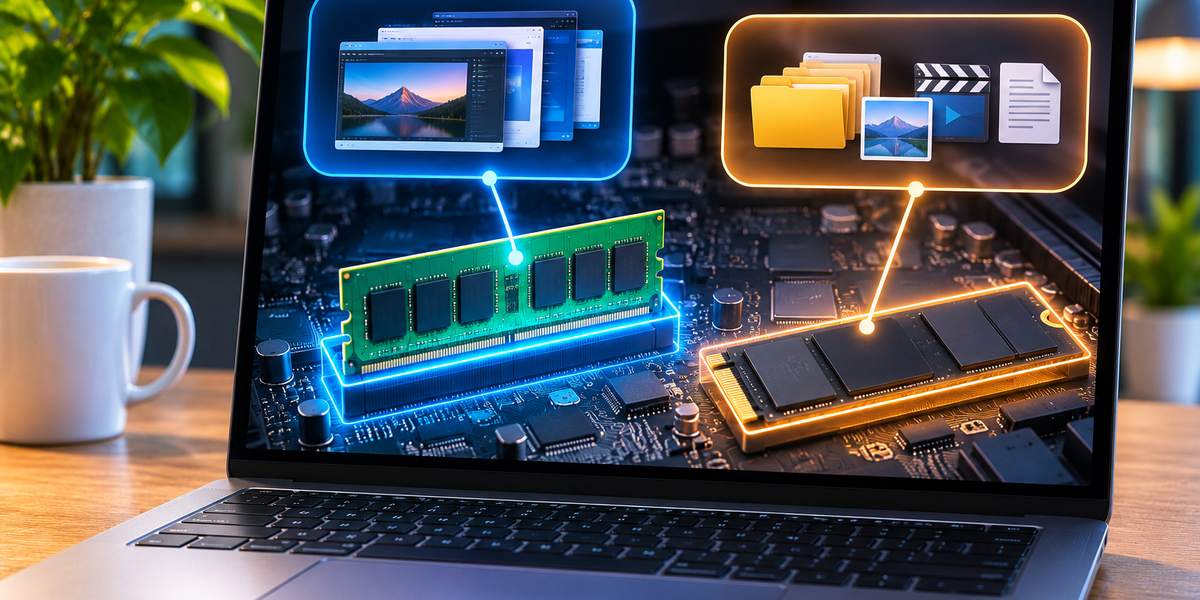
When you’re buying a new phone or computer, you’ll usually see two numbers that sound strangely similar. One device might have 8 GB of RAM and 256 GB of storage. Another might offer 16 GB of RAM and 512 GB of storage. Both are measured in gigabytes, both hold digital information, and both affect how your device performs. But they do completely different jobs.
The simplest way to understand the difference is this: RAM is the temporary workspace your device uses while it’s working, while storage is where your files and applications live long term. RAM helps your device handle what you’re doing right now. Storage determines how much information you can keep on the device.
Understanding that distinction makes many confusing technology specifications much easier to read.
Think of RAM as Your Desk and Storage as Your Filing Cabinet
Imagine you’re working at a desk. You have several documents open, a notebook beside you, a calculator, and perhaps a few books you’re using for reference. Everything you’re actively working with is sitting on the desk because you need to reach it quickly.
That desk is similar to RAM.
Now imagine a filing cabinet beside the desk containing hundreds of folders. The cabinet can store far more information than your desk, but you don’t need every document sitting in front of you all the time. When you need something, you take it out of the cabinet and put it on the desk.
That filing cabinet is similar to storage.
A bigger filing cabinet allows you to keep more documents. A bigger desk allows you to work comfortably with more documents at the same time. Making the filing cabinet enormous doesn’t automatically make the desk larger, and making the desk larger doesn’t give you unlimited space to permanently store your files.
Your computer works according to a similar principle.
What RAM Actually Does
RAM stands for Random Access Memory. It’s a type of extremely fast memory your device uses to hold information that the processor may need while programs are running.
When you open an application, some of the information required by that application is loaded from storage into RAM. The processor can then access that information much more quickly than if it constantly had to retrieve everything from long-term storage.
Suppose you’re using a laptop with a browser, music app, spreadsheet, messaging app, and photo editor open at the same time. Information associated with those active applications can occupy RAM while you’re working.
The more things you’re doing simultaneously, the more RAM your computer may need.
That’s why RAM is particularly important for multitasking.
What Storage Actually Does
Storage is where your device keeps information for the long term.
Your operating system is stored there. Your applications are stored there. So are your photographs, videos, documents, downloaded music, games, and other files.
When you turn off your computer, those files remain.
Modern phones and laptops commonly use flash-based storage, such as solid-state drives in computers and integrated flash storage in smartphones. Older computers may also use mechanical hard disk drives.
The underlying technologies can differ, but the purpose is broadly the same: storage preserves information until you decide to delete or replace it.
If your phone has 256 GB of storage, that capacity is primarily about how much information the device can keep.
It doesn’t mean the phone has 256 GB of working memory available to run applications.
Why Does a Device Need Both?
You might reasonably wonder why a computer doesn’t simply use its storage for everything.
The answer is speed.
RAM is designed to provide the processor with extremely fast access to information that is actively being used. Long-term storage is designed to preserve much larger amounts of information, even when the device has no power.
Those are different engineering requirements.
Your device therefore uses them together.
When you open a program, the application itself remains installed in storage. The system loads the information it currently needs into RAM. The processor works with that information. If you save a document, the resulting file can be written back to storage.
This movement happens constantly while you use your device.
You rarely notice it because the operating system manages most of the process automatically.
RAM Is Temporary
One of the most important differences between RAM and storage is what happens when power disappears.
RAM is generally volatile memory. It requires power to retain the information it currently holds.
Turn the device off, and the contents of RAM disappear.
That’s perfectly fine because RAM isn’t intended to permanently store your family photos or important documents. It’s a temporary working area.
Storage is non-volatile. It retains information when the device is turned off.
That’s why you can shut down your laptop tonight and still find your documents tomorrow morning.
The files were saved in storage, not RAM.
What Happens When You Open an App?
Imagine opening a photo-editing application.
The application is installed on your computer’s storage drive. When you click its icon, the operating system retrieves the necessary program information from storage and loads relevant parts into RAM.
The CPU begins executing the application’s instructions. As you open photographs and start editing them, additional information may be placed in RAM because the computer needs fast access to it.
When you save your finished photograph, the resulting file is written to storage.
Then you close the application.
The RAM it was using can now be made available for something else.
The application itself hasn’t disappeared. It’s still installed in storage and can be loaded again the next time you need it.
What Happens When You Run Out of RAM?
Running out of RAM doesn’t usually mean your computer instantly stops working.
Modern operating systems have ways of coping when physical RAM becomes scarce. They can move some information between RAM and storage or reclaim memory from applications that don’t currently need it.
The problem is that storage is much slower than RAM for this purpose.
If your computer repeatedly needs to move information back and forth because there isn’t enough RAM, performance can deteriorate significantly.
You might notice applications taking longer to respond, browser tabs reloading, delays when switching between programs, or the entire system feeling sluggish.
This is why adding RAM can dramatically improve certain computers, particularly when the device regularly uses almost all of the memory it has available.
The benefit isn’t necessarily that the processor became faster.
The computer simply has more high-speed workspace.
What Happens When You Run Out of Storage?
Running out of storage causes a different set of problems.
If your phone is nearly full, you may not have enough space to take new photographs, download files, install applications, or install major software updates.
A computer with very little free storage can also experience performance problems because the operating system needs working space for temporary files, updates, caches, and other operations.
But deleting a few videos to free storage doesn’t give your device additional RAM.
Likewise, having 1 TB of empty storage doesn’t compensate for having too little RAM.
They’re separate resources.
More RAM Doesn’t Mean More Space for Photos
This is one of the easiest mistakes to make when comparing devices.
Imagine two phones.
Phone A has 8 GB of RAM and 128 GB of storage.
Phone B has 6 GB of RAM and 256 GB of storage.
Phone A has more RAM, which can help with certain forms of multitasking and demanding applications.
Phone B has more storage, which means it can keep more photographs, videos, applications, and files.
Neither number automatically tells you which phone is better.
It depends on how you use it.
Someone who records huge amounts of video may care more about storage. Someone running demanding applications or keeping many applications active may benefit more from additional RAM.
More Storage Doesn’t Necessarily Make a Computer Faster
Storage capacity and storage speed are also different things.
A 2 TB drive can store twice as much information as a 1 TB drive, but that doesn’t automatically mean it’s twice as fast.
The type of storage matters.
Modern solid-state drives, or SSDs, are dramatically faster than traditional mechanical hard drives for many tasks because they don’t need physical moving components to locate data.
Even among SSDs, performance can vary significantly depending on the underlying technology and interface.
So when evaluating storage, there are really two separate questions.
How much can it hold?
And how quickly can it read and write information?
Capacity answers the first.
Storage technology helps answer the second.
Does More RAM Make Everything Faster?
Not necessarily.
Suppose your computer has 16 GB of RAM, but your normal workload uses only 8 GB.
Upgrading to 32 GB won’t automatically make every website load twice as fast or make your processor twice as powerful.
You simply have more unused memory available.
RAM becomes particularly valuable when your workload actually needs it.
If you regularly edit large videos, work with huge photographs, run virtual machines, use professional creative software, work with large datasets, or keep many demanding applications open simultaneously, additional RAM can make a significant difference.
For someone who mainly browses the web, writes documents, watches videos, and sends emails, the difference may be much smaller once the device already has enough RAM for those tasks.
The goal isn’t to have the largest RAM number possible.
It’s to have enough RAM for what you actually do.
Why Do Browsers Use So Much RAM?
Web browsers can consume surprisingly large amounts of memory.
Modern websites are effectively applications. They contain scripts, images, video, animations, advertisements, interactive interfaces, and other complex elements.
Browsers also often isolate tabs and processes for security and stability.
Open dozens of tabs and the memory requirements can grow quickly.
Operating systems and browsers may respond by unloading or suspending tabs that haven’t been used recently. When you return to one, it may need to reload.
That’s why having more RAM can be useful for people who routinely keep large numbers of browser tabs and applications open simultaneously.
Smartphones Use RAM Too
The same basic principles apply to your phone.
When you open applications, information is loaded into RAM. The operating system manages that memory and decides which applications can remain readily available in the background.
If memory becomes limited, the phone may remove background applications from active memory.
When you return to one of them, it may have to reload.
This is why two phones with similar processors but different amounts of RAM can sometimes behave differently when switching among many applications.
However, comparing RAM across phones isn’t always straightforward. Different operating systems manage memory differently, so a phone with a larger RAM number isn’t automatically better than another phone with less.
Hardware and software work together.
Why Is RAM So Much Smaller Than Storage?
You might have a laptop with 16 GB of RAM and 512 GB of storage.
Why not simply give it 512 GB of RAM too?
Because RAM and storage are designed differently and have different costs, physical requirements, power characteristics, and purposes.
RAM needs to provide extremely fast access for active workloads. Storage needs to retain much larger amounts of information economically over long periods.
Most users don’t need hundreds of gigabytes of active working memory.
They do, however, want enough storage for thousands of photographs, applications, videos, and documents.
That’s why consumer devices usually contain far more storage than RAM.
What Is Virtual Memory?
When a computer doesn’t have enough physical RAM for everything it wants to keep immediately available, the operating system can use part of the storage system as additional working space.
This is commonly associated with concepts such as virtual memory, swap space, or paging.
Imagine your desk becoming full.
You temporarily move some papers into a nearby drawer so you can continue working. When you need those papers again, you move them back onto the desk.
The system does something conceptually similar.
This helps the computer continue functioning when RAM is under pressure, but it isn’t a perfect replacement for physical RAM because storage access is slower.
Modern SSDs make the process much faster than it was with old mechanical hard drives, but RAM remains significantly better suited to active memory workloads.
What Does “Memory” Mean?
Technology terminology makes this topic more confusing because people sometimes use the word memory to describe both RAM and storage.
Technically, both are forms of computer memory.
But in everyday device specifications, “memory” commonly refers to RAM, while “storage” refers to long-term capacity.
This is why a laptop listing might say:
16 GB memory, 512 GB SSD storage.
The first number describes RAM.
The second describes storage.
Once you know that distinction, specification sheets become much easier to understand.
How Much RAM Do You Actually Need?
There isn’t one number that’s correct for everyone.
The amount of RAM you need depends on the operating system, the applications you use, and the way you multitask.
Basic computing requires relatively little compared with professional workloads. Browsing, email, office applications, streaming, and ordinary communication generally need far less memory than video editing, software development, engineering applications, virtual machines, 3D rendering, or other demanding work.
The same principle applies to smartphones.
Instead of automatically buying the device with the largest RAM number, consider your workload and how long you plan to keep the device.
Having some extra capacity can help with future applications and operating-system updates.
But RAM you never use doesn’t provide a magical performance boost.
How Much Storage Do You Need?
Storage needs are much easier to visualize because you can think about what you actually keep.
Photographs and ordinary documents may consume relatively little space individually. High-resolution video can consume enormous amounts very quickly. Modern games and professional applications can also require tens or even hundreds of gigabytes.
Cloud storage can reduce pressure on local storage, but it doesn’t eliminate the need for local space.
Applications still need to be installed. Operating systems need room for updates. Offline files need somewhere to live. Photos and videos may remain on the device even when they’re synchronized to the cloud.
If you regularly find yourself deleting things just to install an update, you probably need more storage on your next device.
What About Cloud Storage?
Cloud storage adds another layer to the terminology.
Services that store your files online are called storage because they perform the same basic long-term function: preserving information.
The major difference is location.
Instead of the file existing only on storage hardware inside your device, a copy may be stored on remote servers operated by a cloud provider.
Your phone or computer retrieves that information through a network when needed.
Cloud storage doesn’t increase your physical RAM.
And depending on how synchronization works, it doesn’t necessarily eliminate local storage use either.
It’s another place for information to live.
RAM and Storage Work Together Constantly
Although RAM and storage serve different purposes, your device continuously moves information between them.
You open an application stored on an SSD.
Relevant information moves into RAM.
The processor works with it.
You edit a document.
The current working information exists in memory.
You press Save.
The updated file is written to storage.
You close the application.
The RAM becomes available for other tasks.
You shut down the computer.
The temporary information in RAM disappears, but the saved document remains in storage.
This cycle happens constantly without requiring you to manage it manually.
Why Understanding the Difference Matters When Buying a Device
Manufacturers love large numbers.
A phone advertised with 512 GB sounds impressive. A laptop with 32 GB sounds powerful.
But the numbers mean very different things.
If your current laptop slows dramatically when you have several professional applications open, additional RAM might matter more than doubling your storage.
If your phone constantly tells you that it doesn’t have enough space for photographs, more storage is probably the priority.
If both are sufficient for your needs, then other factors such as processor performance, battery life, display quality, repairability, camera quality, and price may matter more.
Understanding the specifications helps you pay for improvements you’ll actually notice.
The Simple Version
RAM and storage both hold digital information, but they hold it for different reasons.
RAM is your device’s temporary workspace. It keeps information readily available while applications are running and helps the system handle multiple active tasks efficiently.
Storage is your device’s long-term filing cabinet. It keeps applications, photographs, videos, documents, and the operating system even when the device is turned off.
More RAM gives your computer more room to work.
More storage gives it more room to keep things.
If you remember only one analogy, make it this one: RAM is the size of your desk. Storage is the size of your filing cabinet.
A larger desk lets you spread out more work at once.
A larger filing cabinet lets you keep more things.
And your phone or computer needs both to work properly.