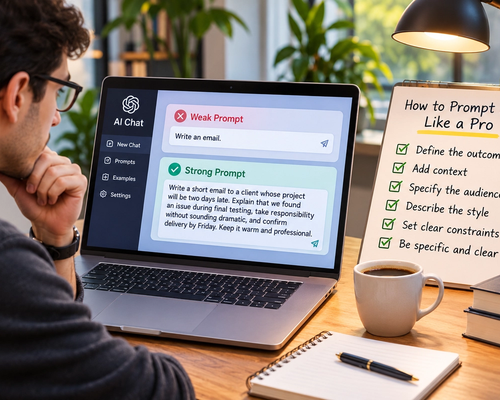
How to Prompt AI Like a Pro
Most people start using AI the same way they use Google. They type a short request, press Enter, and hope the system understands what they had in mind.
Sometimes it does. Sometimes the answer is generic, too long, too formal, factually shaky, or simply not what they wanted.
Then comes the conclusion: the AI isn’t very good.
But often, the problem isn’t that the AI can’t do the task. It’s that it wasn’t given enough information to understand what a good result looks like.
Learning to prompt AI well isn’t about memorizing secret commands or discovering a magical collection of phrases. It’s mostly about communicating clearly. The better you explain the goal, context, constraints, and desired output, the easier it becomes for an AI system to give you something useful.
You don’t need to become a “prompt engineer.” You just need to stop making the AI guess.
A Prompt Is More Than a Question
A prompt is whatever information you give an AI system before asking it to respond.
That could be a simple question such as “What is compound interest?” But it can also include background information, examples, documents, instructions, formatting requirements, and constraints.
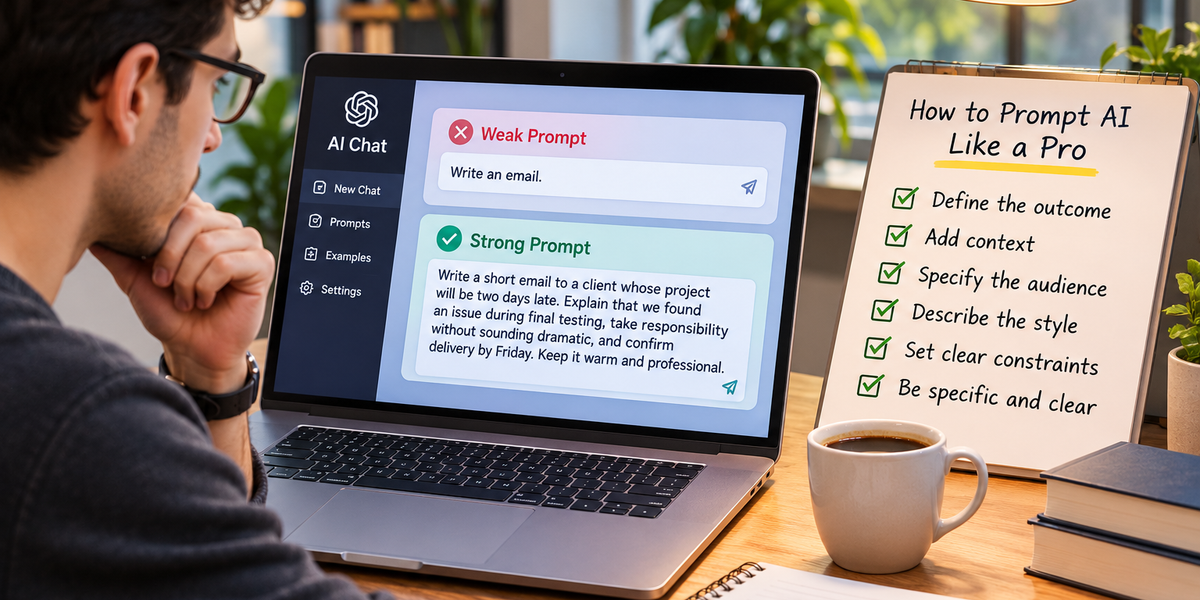
Compare these two requests.
“Write an email.”
And:
“Write a short email to a client whose project will be two days late. Explain that we found an issue during final testing, take responsibility without sounding dramatic, and confirm delivery by Friday. Keep it warm and professional.”
The second prompt gives the AI much more to work with.
It knows who the audience is, what happened, what information needs to be included, what tone to use, and how long the response should be.
The AI didn’t suddenly become smarter between the two prompts.
The task became clearer.
Start With the Outcome You Actually Want
One of the easiest ways to improve a prompt is to state the final goal rather than vaguely describing the topic.
Instead of asking:
“Tell me about LinkedIn.”
Try:
“Help me improve my LinkedIn profile so recruiters looking for project managers can understand my experience within 30 seconds.”
The second prompt gives the AI a target.
This matters because the same topic can support dozens of different tasks. If you say “Tell me about budgeting,” you could want a definition, a personal budget, a business budgeting template, investment advice, or an explanation for a teenager.
Before prompting AI, ask yourself a simple question: What do I want to have when this conversation is finished?
Then tell the AI.
Give It Context
Context is one of the most powerful ingredients in a good prompt.
Suppose you ask:
“Should I accept this job?”
There is almost nothing useful an AI can conclude from that alone.
Now add context:
“I currently work remotely four days a week and value flexibility because I have a young child. The new role pays 20% more but requires a 45-minute commute each way three days a week. It offers better promotion opportunities, but I’m worried about losing family time. Help me compare the trade-offs.”
Now there is something meaningful to analyze.
Good context doesn’t mean telling the AI your entire life story. It means providing the information that would materially change the answer.
Think about what you would tell a smart colleague before asking for their advice.
The AI probably needs something similar.
Be Specific About the Audience
Writing changes dramatically depending on who will read it.
An explanation intended for a five-year-old shouldn’t sound like a university textbook. A presentation for executives shouldn’t contain the same level of technical detail as documentation for engineers.
So tell the AI who the output is for.
Instead of:
“Explain cybersecurity.”
Try:
“Explain cybersecurity to a small-business owner with no technical background. Focus on the five risks they should actually care about.”
Or:
“Explain this cybersecurity architecture to an experienced security engineer. Skip basic definitions and focus on potential weaknesses.”
Same topic. Completely different output.
Audience is one of the simplest prompt details people forget.
Tell the AI What Good Looks Like
People often provide detailed instructions about what they want the AI to do but almost no information about what the finished result should feel like.
Words such as “professional” aren’t always enough.
Professional could mean formal corporate language, clear conversational business writing, an academic tone, or a polished sales style.
More useful instructions might be:
“Write naturally, like an experienced manager speaking to another manager. Keep sentences relatively short. Avoid corporate buzzwords and exaggerated claims.”
Now the AI has much clearer stylistic boundaries.
You can describe tone, structure, level of detail, vocabulary, length, and even what you don’t want.
The clearer your definition of a good answer, the less editing you’re likely to need afterward.
Constraints Make AI More Useful
It can feel counterintuitive, but giving AI fewer options can produce better results.
Imagine asking:
“Give me ideas for a business.”
The possibilities are almost infinite.
Now try:
“Give me five online business ideas I could start alone for under $500. I can spend around ten hours per week, I’m good at writing and project management, and I don’t want a business that depends on showing my face on social media.”
Those constraints dramatically narrow the search space.
The AI can now generate ideas relevant to your actual situation rather than producing the usual list of dropshipping, consulting, blogging, and online courses.
Useful constraints might include budget, deadline, word count, available tools, audience, skill level, location, format, things you’ve already tried, or things you absolutely don’t want.
Constraints aren’t obstacles to creativity.
They give creativity direction.
Give Examples When Style Matters
AI is particularly good at learning from examples provided directly in the conversation.
Suppose you want product descriptions that match a particular brand voice.
Instead of spending several paragraphs trying to explain the voice, you can provide two or three examples and say:
“Use these as style references. Match their level of formality, sentence length, and understated tone, but don’t copy the wording.”
Examples give the model something concrete to imitate.
This technique is sometimes called few-shot prompting because you’re giving the model a few examples of the pattern you want.
It works especially well for repeated tasks such as headlines, product descriptions, social posts, customer-support responses, summaries, and structured data extraction.
Ask for the Format You Need
If you know how you want the answer organized, say so.
For example:
“Compare these three options in a table with columns for price, advantages, disadvantages, and best use case.”
Or:
“Give me a 150-word summary followed by three recommended actions.”
Or:
“Turn these meeting notes into a decision log. For each decision, include the owner, deadline, and unresolved question.”
Formatting instructions make AI outputs much easier to use.
Otherwise, you may get six paragraphs when what you really needed was a table, or twenty bullet points when you wanted a polished explanation.
Don’t make the AI guess how you’re planning to use the information.
Give AI the Source Material
If your task depends on specific information, provide that information whenever possible.
Suppose you ask:
“Improve my résumé.”
The AI can give general advice.
But if you provide the résumé, the job description, and a few details about your actual achievements, the task becomes much more concrete.
You can ask:
“Review my résumé against this job description. Identify the five biggest gaps, then rewrite only the sections where my existing experience supports a stronger match. Don’t invent skills or achievements.”
That final instruction matters.
AI can be excellent at transforming information you provide, but you should be careful about asking it to fill factual gaps creatively.
For factual work, source material is often more valuable than elaborate prompting tricks.
Break Complicated Tasks Into Stages
People sometimes give AI enormous tasks all at once.
“Create my entire marketing strategy.”
Technically, the AI can produce something. But it will probably have to make many assumptions.
A better approach is to work through the problem in stages.
First, define the customer.
Then analyze competitors.
Then clarify positioning.
Then develop messaging.
Then choose channels.
Then build a content plan.
Each stage gives you an opportunity to correct assumptions before they spread through the rest of the work.
This is particularly useful for business plans, research, writing projects, strategy, coding, and complex decisions.
Treat AI less like a vending machine where one prompt produces the final product and more like a collaborator you can direct throughout the process.
Don’t Ask for 50 Ideas When You Need Three Good Ones
AI makes generating large quantities of ideas incredibly easy.
That doesn’t mean more is always better.
Ask for “100 business ideas,” and you’ll probably get plenty of repetition and mediocre suggestions.
Instead, ask for fewer ideas with stronger criteria.
For example:
“Give me five ideas. For each one, explain why it fits my constraints, the biggest downside, and what I could do this week to test whether people actually want it.”
Now the AI has to do more than generate.
It has to evaluate.
That’s usually more valuable.
Ask AI to Compare, Not Just Recommend
Questions such as “What’s the best laptop?” or “What’s the best project-management tool?” often produce weak answers because “best” depends on what you care about.
A better prompt defines the decision.
For example:
“Compare these three laptops for someone who travels frequently, writes for work, uses dozens of browser tabs, and occasionally edits photos. Battery life and weight matter more to me than gaming performance.”
Now the AI can reason around priorities.
You can go further and ask it to explain what would make each option the wrong choice.
That often reveals more useful information than asking for a simple winner.
Tell It What You’ve Already Tried
When asking AI to solve a problem, explain what hasn’t worked.
Suppose you say:
“Help me get more newsletter subscribers.”
You’ll probably receive standard advice about social media, lead magnets, SEO, and calls to action.
Instead, say:
“I’ve already added signup forms to every article and promote the newsletter twice a week on LinkedIn. Traffic is growing, but visitors aren’t converting. Give me five hypotheses for why and tell me how to test each one.”
Now you’re much less likely to receive advice you’ve already implemented.
This principle works for troubleshooting almost anything, from marketing campaigns to computer problems.
The more the AI knows about what you’ve eliminated, the more useful its next suggestion can become.
Ask for Criticism, Not Just Validation
AI assistants can sometimes be overly agreeable if your prompt strongly suggests the answer you want.
For example:
“Explain why my business idea is great.”
Unsurprisingly, you’ll probably receive a flattering explanation.
Instead, try:
“Evaluate this business idea as a skeptical investor. Identify the three assumptions most likely to be wrong, what evidence would change your mind, and the cheapest way I could test each assumption.”
That prompt gives the AI permission to challenge you.
You can use the same approach for writing.
Instead of:
“Is this article good?”
Try:
“Act as a strict editor. Identify anything repetitive, unsupported, confusing, generic, or unnecessary. Don’t rewrite it yet.”
AI becomes more useful when you use it to expose weaknesses rather than simply confirm your existing opinion.
Ask It to State Its Assumptions
Sometimes AI has to make assumptions because your prompt doesn’t contain enough information.
You can make those assumptions visible.
For example:
“Create a launch plan based on the information below. Before giving me the plan, list any important assumptions you’re making.”
Now you can spot problems immediately.
Maybe the AI assumed your audience is consumers when you sell to businesses. Maybe it assumed you have a paid advertising budget when you don’t.
Once those assumptions are visible, you can correct them.
This is especially useful for strategic work where a small misunderstanding at the beginning can distort the entire answer.
Tell It When Accuracy Matters More Than Creativity
Different tasks require different behavior.
If you’re brainstorming names for a fictional kingdom, creativity matters more than factual verification.
If you’re researching a medical treatment, legal requirement, product specification, or current statistic, accuracy matters much more.
Tell the AI that.
You might say:
“Accuracy matters more than completeness. If you can’t verify a claim, say so rather than guessing.”
If the AI has access to web search or external sources, you can also explicitly ask it to research current information and cite reliable sources.
The key is recognizing that a beautifully written answer isn’t necessarily a correct answer.
AI is very good at producing plausible language.
You still need to distinguish plausibility from evidence.
Don’t Assume AI Knows What’s Happening Today
AI models are trained on existing data, but that doesn’t automatically mean they know the latest information.
If you’re asking about current prices, elections, product releases, laws, company leadership, sports results, travel schedules, or breaking news, current sources may be necessary.
Instead of simply asking:
“What’s the best phone right now?”
you can ask an AI system with browsing capabilities to compare currently available models using up-to-date specifications and pricing.
The same applies to research.
If the answer depends on something that may have changed recently, make freshness part of the task.
Use Follow-Up Prompts Instead of Starting Over
Your first prompt doesn’t have to be perfect.
In fact, one of the biggest advantages of conversational AI is that you can refine the output.
If the first answer is too formal, say:
“Make it warmer and more natural.”
If it’s too long:
“Cut this by 40% without removing the main argument.”
If it’s generic:
“These recommendations are too obvious. Give me options that assume I’ve already tried the standard approaches.”
If one section is strong:
“Keep the second idea. Drop the others and develop three variations of that approach.”
Prompting well is often an editing process.
The conversation itself becomes part of the prompt.
Don’t Keep Saying “Make It Better”
“Make this better” gives the AI very little direction.
Better how?
More persuasive? Shorter? Clearer? More authoritative? Less formal? Better structured? More original?
Instead of:
“Make this introduction better.”
Try:
“Make this introduction more direct. Remove the generic opening, establish the problem within the first two sentences, and keep it under 100 words.”
Now “better” has a definition.
This small change can dramatically improve AI-assisted writing.
You Usually Don’t Need Elaborate Role-Playing
Prompt advice online sometimes makes it seem as though every request needs to begin with something like:
“You are the world’s greatest award-winning expert with 30 years of experience…”
Usually, it doesn’t.
Giving the model a relevant perspective can help. Asking it to review a contract from the perspective of a procurement manager or critique a landing page as a conversion copywriter can clarify what kind of analysis you want.
But extravagant role-playing isn’t a substitute for useful information.
“Act as the world’s best marketer” is much less useful than explaining your product, audience, objective, budget, current results, and constraints.
Specific context beats dramatic titles.
A Simple Prompt Formula That Works
You don’t need a complicated framework for every request. A useful prompt can often be built from five elements: the task, context, constraints, desired output, and quality bar.
For example:
“I need to choose between three project-management tools for a 12-person remote team. We mainly manage client content projects and currently lose track of approvals. Our budget is $150 per month. Compare Tool A, Tool B, and Tool C based on approval workflows, ease of use, integrations, and total cost. Give me a table followed by your recommendation and the strongest reason not to choose your recommended option.”
That prompt works because the AI knows what decision you’re making, what situation you’re in, what matters, what limits exist, and what output you want.
There’s no magic phrase.
There’s simply enough information to do the job properly.
A Better Way to Prompt for Writing
Suppose you need a LinkedIn post.
A weak prompt would be:
“Write a LinkedIn post about leadership.”
A stronger prompt might be:
“Write a LinkedIn post for mid-career managers about why constantly solving employees’ problems can weaken a team. Start with a specific observation rather than a motivational quote. Use a conversational but intelligent tone. Include one practical example and end with a question. Keep it under 250 words. Avoid phrases like ‘in today’s fast-paced world’ and don’t use emojis.”
The difference is enormous.
You’ve defined the audience, argument, structure, tone, length, and things to avoid.
The AI now has boundaries within which it can create.
A Better Way to Prompt for Research
Suppose you’re researching remote work.
Instead of:
“Research remote work.”
Try:
“Research whether hybrid work affects employee retention. Focus on studies and large datasets published within the last five years. Separate evidence about retention from evidence about productivity. For each major claim, provide the source and publication date. Flag areas where the research is mixed rather than forcing a conclusion.”
This prompt doesn’t simply ask for information.
It defines how evidence should be evaluated.
That’s particularly important when using AI for serious research.
A Better Way to Prompt for Decisions
AI can be useful for decisions, but you shouldn’t simply outsource the choice.
Instead, use it to structure your thinking.
For example:
“I’m deciding whether to accept a higher-paying job that requires more travel. Ask me the five questions that would most change the decision. After I answer, create a comparison based on my priorities rather than giving generic career advice.”
This is often more valuable than immediately asking, “Which job should I take?”
A good AI interaction can help you discover what matters rather than pretending there is one objectively correct answer.
A Better Way to Prompt for Learning
AI is especially useful when you tell it what you already know.
Instead of:
“Teach me Excel.”
Try:
“I can already use basic formulas, filters, and pivot tables in Excel, but I don’t understand XLOOKUP, INDEX/MATCH, or Power Query. Build me a seven-day learning plan with one 20-minute exercise per day. Use a fictional sales dataset throughout so each lesson builds on the previous one.”
Now the AI can teach at the right level.
You can also ask it to quiz you, explain mistakes, change the difficulty, or provide another example when something doesn’t click.
That’s much closer to having a tutor than using a search engine.
Know When Prompting Isn’t the Problem
Sometimes you can rewrite a prompt ten times and still not get a reliable answer.
That may mean the AI simply doesn’t have the information, capability, or tools needed for the task.
No clever prompt can guarantee access to information a model doesn’t possess. No prompt can turn unreliable data into reliable evidence. No prompt can guarantee perfect reasoning.
This is an important part of becoming good at using AI: recognizing when to stop prompting and use another source.
Sometimes you need a database.
Sometimes you need current web research.
Sometimes you need a calculator.
Sometimes you need a doctor, lawyer, accountant, engineer, or another qualified professional.
Knowing the limits of the tool is part of using it well.
The Best Prompts Feel Surprisingly Normal
The funny thing about advanced prompting is that, once you remove all the jargon, it looks a lot like good communication.
Explain what you’re trying to accomplish.
Provide the relevant background.
Define your constraints.
Say who the output is for.
Describe what a good result looks like.
Provide source material when it matters.
Ask the AI to challenge assumptions.
Then refine the result through conversation.
You don’t need a library of 500 “ultimate ChatGPT prompts.” You don’t need to begin every message with an elaborate persona. And you don’t need to learn a secret language for talking to AI.
The people who get the most useful results from AI usually aren’t the people with the cleverest prompts.
They’re the people who give the clearest instructions.
So the next time an AI gives you a disappointing answer, don’t immediately ask it to “try again.”
Tell it what was wrong, what you actually need, and what a better answer would look like.
That’s prompting like a pro.