How to Use AI to Save 5 Hours a Week

The biggest promise of artificial intelligence isn’t that it can write a poem in three seconds or generate a picture of your dog dressed as an astronaut. For most people, the genuinely useful part is much less dramatic: AI can remove dozens of small, repetitive tasks from your week.
Writing the same kinds of emails. Summarizing long documents. Turning messy meeting notes into something useful. Researching a topic before a call. Reformatting information. Creating first drafts. Planning your week. Comparing options. Trying to remember what you were supposed to do after a meeting.
None of these tasks necessarily takes hours on its own. That’s exactly why we underestimate them.
Ten minutes here, fifteen minutes there, twenty minutes rewriting an email you already knew how to write. By Friday, you’ve spent hours doing work that could have been shortened considerably.
Saving five hours a week with AI doesn’t require automating your entire job. It means identifying those small pockets of repetitive work and using AI strategically enough to reclaim roughly an hour a day.
Here’s how to do it without turning your working life into one enormous conversation with a chatbot.
Start by Finding Where Your Time Actually Goes
Before looking for AI tools, look at your week.
Most people immediately think about their largest tasks. If you’re a marketer, you might think about campaigns. If you’re a project manager, you think about projects. If you’re a consultant, you think about client work.
But the easiest time savings are often hiding between those tasks.
Think about yesterday.
How much time did you spend writing emails? Searching through documents? Preparing for meetings? Rewriting something because the first version sounded wrong? Turning notes into tasks? Looking up information? Formatting reports? Creating presentations? Reading material just to find the three paragraphs relevant to you?
Those are the opportunities.
For a week, notice every task that makes you think, “I know how to do this; I just don’t want to spend 20 minutes doing it.”
That’s usually where AI becomes useful.
Don’t Automate What Requires Your Judgment
There’s an important distinction between doing the work and preparing the work for you to judge.
Suppose you’re hiring someone.
AI shouldn’t necessarily decide whom you hire. But it can help organize interview notes, compare candidates against predefined criteria, identify questions you haven’t answered, and prepare a summary before you make the decision.
If you’re writing an important client proposal, AI doesn’t need to invent your strategy. It can organize your rough notes, improve the structure, identify repetition, and create a first draft for you to review.
The goal isn’t to remove yourself from important decisions.
It’s to spend less time on the mechanical work surrounding them.
That distinction makes AI much more useful—and much safer.
Save 30 Minutes a Day on Email
Email is one of the easiest places to reclaim time.
You probably don’t need AI to write “Thanks, I’ll take a look.” But longer messages can consume surprising amounts of time, particularly when the situation is sensitive.
Maybe you need to disagree with someone without sounding confrontational. Explain a delay. Follow up with a client. Summarize several decisions. Decline a request politely. Ask someone to redo work without demoralizing them.
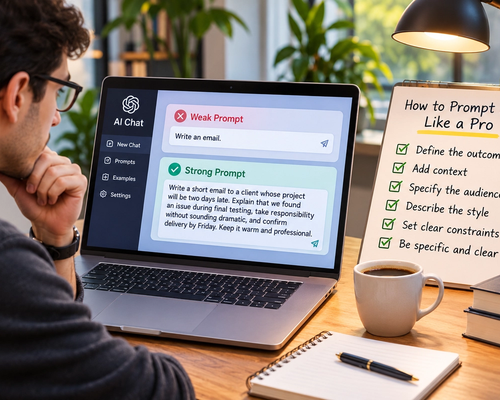
Instead of staring at the blank message box, give AI the facts.
You might write:
“Draft a short email to a client explaining that the report will arrive Friday instead of Wednesday. We found inconsistent data during final review and need two additional days to verify it. Be accountable and reassuring, but don’t over-apologize.”
Now you’re editing rather than composing from zero.
You can also paste a rough version you’ve already written and ask AI to make it clearer while preserving your meaning.
If you write ten substantial emails a day and save only three minutes on each, you’ve already reclaimed half an hour.
Turn Rough Thoughts Into Finished Writing
Many people don’t struggle with knowing what they want to say.
They struggle with turning it into polished writing.
That’s a perfect AI task.
Instead of spending 30 minutes carefully constructing a message, start with rough notes:
“Client wants launch Friday. Design still not approved. Need approval Wednesday latest. If later, launch probably moves. Don’t want this to sound like we’re blaming them.”
Then ask AI to turn those notes into a concise client message.
The thinking remains yours.
AI handles the transformation from thoughts into prose.
This works for emails, reports, proposals, project updates, performance feedback, meeting summaries, internal announcements, presentations, and many other everyday writing tasks.
The trick is to give AI the substance instead of expecting it to invent the substance.
Stop Reading Every Document From Beginning to End
Not every document deserves your full attention.
Sometimes you receive a 40-page report when you really need to know three things: what changed, what affects your team, and what needs a decision.
AI can help you extract those answers.
Instead of simply asking for a generic summary, tell it what matters.
For example:
“Summarize this report for me. Focus on changes that affect marketing, new deadlines, budget implications, and anything requiring approval. Ignore background information unless it’s necessary to understand a decision.”
That is much more useful than “summarize this.”
You can then ask follow-up questions about specific sections.
This doesn’t mean you should never read the original document. Contracts, important research, legal material, financial documents, and other high-stakes information may deserve careful review.
But many workplace documents don’t require equal attention to every paragraph.
AI can help you decide where to focus yours.
Use AI Before Meetings, Not Just After Them
Meeting preparation often involves gathering information from several places.
What happened last time? What did we promise the client? Which questions are still unresolved? What numbers changed? What needs a decision today?
Instead of manually reconstructing everything, use AI to create a short briefing when the relevant information is available to it.
You might ask:
“Using these notes from our previous three meetings, prepare a five-minute briefing for tomorrow’s call. Include decisions already made, commitments we made, unresolved issues, and the three questions I should make sure we answer.”
Now you enter the meeting with context already organized.
This can save time while also making the meeting itself shorter because you spend less of it rediscovering information everyone should already know.
Make Meeting Notes Actually Useful
A transcript isn’t a meeting summary.
Neither is a page of random notes.
After a meeting, AI can turn raw information into something actionable.
Give it the transcript or your notes and ask for the decisions, action items, owners, deadlines, unresolved questions, and anything that needs follow-up.
Instead of spending 20 minutes cleaning everything up, you review the result for accuracy and send it.
The review step matters.
AI can misunderstand who agreed to do something or confuse a proposed deadline with a confirmed one. You remain responsible for checking the output.
But reviewing a structured summary is usually much faster than creating one from scratch.
Let AI Create Your First Draft
The blank page consumes a ridiculous amount of professional time.
You know you need a proposal, presentation, report, article, strategy document, or project brief. You know roughly what it needs to contain.
But starting feels disproportionately difficult.
AI is excellent at eliminating the blank page.
Give it your notes, audience, purpose, and constraints, and ask for a first draft.
Then edit aggressively.
This changes the task psychologically. Instead of asking yourself, “What do I write?” you’re asking, “Is this what I mean?”
Editing and judging are often much faster than generating everything from zero.
The first draft doesn’t have to be brilliant.
It just needs to give you something to react to.
Research Faster by Asking Better Questions
Research can consume entire afternoons because the internet makes it incredibly easy to keep opening tabs.
AI can help narrow the search.
Suppose you’re evaluating new project-management software.
Instead of reading twenty product pages from beginning to end, start by defining your criteria.
You might ask an AI system with current web access:
“Compare these five tools for a 15-person remote content team. We care most about client approvals, task dependencies, guest access, Slack integration, and pricing. Use current information from official sources and flag anything you can’t verify.”
Now you have a structured starting point.
You should still verify important claims, particularly pricing, legal information, technical specifications, and anything that affects a significant decision.
But AI can dramatically reduce the amount of irrelevant information you have to process.
Use AI to Compare Options
Humans lose a lot of time moving information between browser tabs and trying to remember which option had which advantage.
AI is good at organizing comparisons.
If you’re evaluating software, travel options, suppliers, insurance plans, proposals, or even different approaches to a project, give the AI your criteria.
Then ask it to compare the options according to those criteria rather than simply declaring a winner.
For example:
“Compare these three proposals based on total cost, implementation time, ongoing workload, flexibility, and risk. Create a table, then explain which option fits our priorities best. Also give me the strongest argument against your recommendation.”
That last sentence is useful.
It forces the analysis beyond simply validating the most obvious choice.
Turn Information Into the Format You Need
A surprising amount of office work is simply moving information from one format into another.
You have a report and need presentation points.
You have meeting notes and need an email.
You have customer feedback and need themes.
You have a long explanation and need a three-sentence executive summary.
You have a technical document and need something a client can understand.
You have a spreadsheet full of comments and need categories.
AI is particularly good at this kind of transformation.
The information already exists. You’re not asking the model to invent anything. You’re asking it to restructure what you have.
Those are often some of the highest-value, lowest-risk AI tasks.
Use AI as Your First Editor
You don’t always need another person to tell you that your introduction is too long.
Before sending important writing, ask AI to critique it.
Not:
“Is this good?”
Instead:
“Review this as a strict editor. Identify repetition, vague claims, unnecessary jargon, confusing sentences, and places where I’m taking too long to make the point. Don’t rewrite anything yet.”
Then decide which suggestions you agree with.
You can follow with:
“Apply suggestions 1, 3, and 5. Leave everything else unchanged.”
This is often much more effective than asking AI to rewrite the entire document immediately.
You maintain control over the voice while using AI to identify problems you’ve stopped noticing after reading the same document six times.
Make Long Email Threads Short Again
Few things waste time quite like returning to an email thread containing 27 messages and trying to figure out what happened.
If your AI tools can securely access the thread—or if company policy permits you to provide the relevant text—you can ask for a concise reconstruction.
For example:
“Summarize this thread chronologically. Tell me what was requested, what changed, what has been agreed, what remains unresolved, and who is waiting for a response.”
Five minutes of rereading can become one minute of reviewing.
Multiply that across an entire week and the savings become meaningful.
Just be careful with confidential information. Not every workplace permits sensitive data to be entered into every AI service.
Turn Brain Dumps Into Plans
Sometimes you don’t need AI to think for you.
You need it to organize the 14 things already bouncing around your head.
Give it the mess.
“I need to finish the client deck, call the dentist, review Sarah’s draft, send invoices, prepare for Thursday’s workshop, book the train, and follow up with James. The deck is due tomorrow, invoices need to go this week, the workshop is Thursday, and Sarah is waiting for feedback.”
Then ask:
“Organize this into a realistic two-day plan. Prioritize anything blocking another person.”
You’ve already supplied the priorities and deadlines.
AI simply helps transform mental clutter into a usable structure.
This can be particularly useful at the beginning or end of a working day.
Use AI to Prepare Difficult Conversations
Not every time-saving use of AI is about producing documents.
Sometimes the time drain comes from overthinking.
You need to give someone negative feedback. Negotiate a deadline. Ask for a raise. Address a misunderstanding with a client. Push back on an unrealistic request.
You may spend an hour rehearsing the conversation mentally.
AI can help you prepare.
Describe the situation and ask it to identify the other person’s likely concerns, the points you need to communicate, and language that is direct without being unnecessarily confrontational.
You can even ask it to role-play the other person and challenge your position.
It won’t make the conversation effortless.
But it can help you walk into it prepared instead of spending the entire morning worrying about how to begin.
Create Reusable Prompts for Repetitive Work
If you repeatedly perform the same task, don’t reinvent the prompt every time.
Create a reusable instruction.
For example, if you review weekly project updates, your standard prompt might be:
“Review this project update and give me: current status, changes since last week, blockers, overdue items, decisions needed from me, and anything that could affect the deadline.”
Next week, you provide new information and use the same structure.
You can create reusable prompts for editing, meeting summaries, research, client updates, weekly planning, data analysis, and other recurring tasks.
The goal isn’t to collect hundreds of prompts.
It’s to create a small number that eliminate repeated thinking.
Let AI Handle the First 80%, Not the Final 100%
One of the worst ways to use AI is to spend 20 minutes prompting it repeatedly because you’re trying to force it to produce something exactly the way you would have done it yourself.
At some point, just edit the thing.
AI is often most valuable when it handles the first 60% to 80% of a task quickly.
It creates the structure.
It organizes the information.
It produces the first draft.
It identifies likely problems.
You provide judgment, experience, taste, accuracy, and final approval.
Trying to remove yourself from the last 20% can sometimes take longer than simply doing it.
Don’t Waste Time Correcting Bad AI
There’s a strange productivity trap that appears when people start using AI heavily.
They begin using it for everything.
Then they spend half their day fixing AI output.
If a task takes you five minutes manually but requires ten minutes of prompting and checking, AI didn’t save you time.
It created work.
The same applies when you don’t have enough information to give the system. If you need to spend 30 minutes explaining a simple task that you could complete in ten, do the task yourself.
AI should remove friction.
If it adds friction, stop.
Build a Five-Hour AI Week
You don’t need dramatic automation to save five hours.
Imagine saving around 20 minutes each day on email and routine writing. That’s roughly 100 minutes per week.
Save another 15 minutes a day by summarizing documents, threads, and research. That’s another 75 minutes.
Use AI for meeting preparation and follow-up and save around 20 minutes across three meetings. That’s another hour.
Use it to create first drafts, comparisons, plans, or reports and save another 60 to 90 minutes over the course of the week.
You’re already approaching five hours.
No autonomous digital employee was required.
You simply stopped spending human attention on tasks that didn’t require much human judgment.
A Simple Monday-to-Friday Routine
You can make AI part of your week without constantly thinking about it.
At the beginning of the day, use it to organize priorities when your schedule is messy.
Before meetings, use it to condense relevant background information.
After meetings, use it to extract decisions and actions.
During focused work, use it for research, first drafts, comparisons, and restructuring information.
Before sending important work, use it as an editor.
At the end of the day, use it to turn unfinished notes into tomorrow’s starting point.
AI becomes most useful when it sits quietly inside existing workflows rather than becoming another workflow you have to manage.
Protect Sensitive Information
Saving time isn’t worth creating a security problem.
Before pasting company information into an AI system, understand what your organization allows.
Customer information, confidential contracts, employee records, passwords, financial data, proprietary code, medical information, and other sensitive material may require approved tools or may not be appropriate to share with certain services at all.
Businesses may provide approved enterprise AI environments with specific privacy, security, and data-handling controls.
Use those policies.
Convenience shouldn’t override confidentiality.
Verify Anything That Matters
AI can write confidently while being wrong.
That’s particularly dangerous when the output contains numbers, dates, quotations, citations, legal requirements, medical information, technical specifications, or current information.
If you’re using AI to transform information you’ve already provided, checking the result can be relatively straightforward.
If you’re asking it to supply facts, verification becomes more important.
The time-saving mindset shouldn’t be:
“I don’t have to check anything anymore.”
It should be:
“I can spend less time producing the basic material and more time checking the parts that actually matter.”
That’s a much better trade.
The Real Productivity Gain Is Attention
Five hours a week sounds like a time-management goal.
But the more valuable benefit may be attention.
Every tiny administrative task forces your brain to switch context.
Write this email.
Find that document.
Summarize those notes.
Reformat this paragraph.
Search for that statistic.
Return to the original task.
Those interruptions fragment your concentration.
If AI can remove even some of them, you don’t simply gain minutes. You preserve more uninterrupted time for work that actually requires you.
Strategy.
Creative thinking.
Relationships.
Leadership.
Decision-making.
Deep work.
Or, frankly, finishing your workday earlier.
The Simple Rule
Don’t begin by asking, “What can AI do?”
Ask:
“What do I repeatedly spend time doing that doesn’t require much of my judgment?”
Start there.
Use AI to summarize information before you read everything. Let it transform rough thoughts into first drafts. Ask it to organize meeting notes, compare options, prepare research, restructure information, and critique your work.
Keep yourself responsible for the decisions, facts, sensitive information, and final result.
You don’t need AI to run your life.
You need it to save you ten minutes.
Then another ten.
Then fifteen more.
Do that consistently, and five hours a week stops sounding ambitious.
It starts sounding surprisingly achievable.